Best AI Meeting Assistant for Executives: Fireflies vs Otter vs Fathom (2026)
Most executives spend 5–8 hours a month manually extracting action items from meetings. The right AI assistant eliminates that. Here's how Fireflies, Otter, and Fathom actually compare for executive workflows.
You finish a two-hour leadership call. You have three pages of notes, six threads of conversation, and four people who may or may not have committed to something. By Thursday, two of those commitments will fall through — not because anyone was careless, but because no one captured who owned what, by when, with enough context to hand off cleanly.
That's the problem a good AI meeting assistant solves. Not transcription — every tool in this category can transcribe. The question is whether it can extract a delegatable action item from a fast-moving executive conversation and get it into the right hands without you doing the work manually.
The short answer: Fireflies.ai is the best option for most executives managing a team. Otter.ai is the right call if you're in a regulated industry and need strong privacy controls. Fathom is a decent starting point for solo executives who want a free, lightweight transcription tool. Here's the full breakdown.

The problem isn't the meeting — it's what happens in the 48 hours after
Fireflies.ai: Best for Executive Teams
Fireflies has the strongest action item extraction of the three. In a 45-minute executive steering meeting, it typically surfaces four to six legitimate action items — each with owner, context, and a reminder trigger you can set. That's the difference between a meeting summary and a tool that actually reduces your coordination overhead.
For a VP of Sales managing a distributed team, the workflow looks like this: Fireflies joins the call automatically, logs it to Slack with tagged summaries per team member, and flags follow-ups to each owner. By the time the meeting ends, the debrief email is already drafted. No re-listening, no manual extraction.
Integration is native across Zoom, Google Meet, Microsoft Teams, and Slack. CRM sync is available on the Team plan. The live summary feature — which delivers a meeting recap before the call is over — is useful when you're running back-to-back blocks and need to hand context to someone joining late.
A real Fireflies output from a product review call looks like: "Action: James to send revised pricing model to Sarah by March 15 — flagged as high priority. Context: team agreed existing tier structure doesn't reflect current CAC payback targets." Not perfect, but usable without editing.
Where it falls short
The free tier is capped at 100 minutes per month — not viable for executive workloads. The Team plan ($20/seat/month) is required for full integration and collaboration features. In calls with eight or more speakers in a noisy environment, summaries get verbose and occasionally miss attribution. Recordings are stored on Fireflies' servers indefinitely unless you delete them — regulated industries should review their data handling policy before deploying across a team.
Best fit
Any executive managing a team across multiple calls per week who needs action item delegation, Slack integration, and CRM logging.
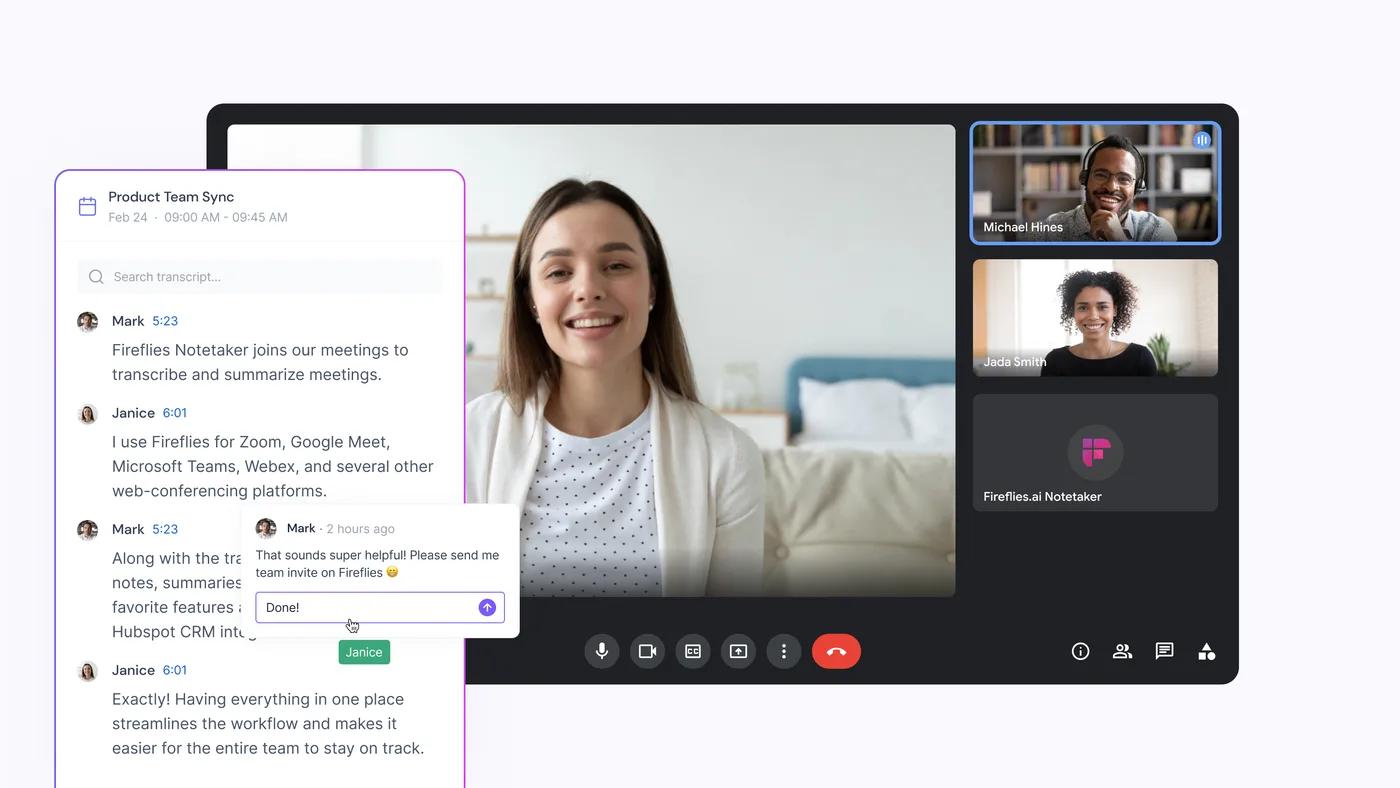
Fireflies.ai joins as a participant, transcribes in real time, and surfaces action items before the call ends
Otter.ai: Best for Regulated Industries
Otter is the strongest option when the primary need is verbatim accuracy and privacy control — not action item extraction. If you're a general counsel who needs to search for exactly what was said about a specific liability, or a healthcare executive who needs to demonstrate compliance with data residency requirements, Otter's toolset is built for that.
Data residency is available in US, EU, and hybrid configurations. Deletion is straightforward. Search across a library of past meetings is fast and accurate. Real-time transcription during a live call is genuinely useful for staying engaged while dialling in from a poor connection.
Where it falls short
Otter's action item extraction is the weakest of the three tools here. It labels sections as "Action Items" but what it captures is often incomplete — you'll see "prepare Q2 budget" but not who owns it or when it's due. For a VP running a tight operation, that means reading the transcript yourself and assigning tasks manually, which mostly defeats the purpose.
Task manager and CRM integration relies on Zapier rather than native connectors, which means building custom workflows instead of using pre-built ones.
Best fit
Executives in healthcare, finance, or legal who need strong privacy controls, data residency options, and the ability to search and cite exact meeting language. Not the right call if delegation speed is the priority.
Fathom: Free, Lightweight, Limited
Fathom is free. Install the Chrome extension and it records your Zoom, Google Meet, or Teams calls with no additional setup. For a solo founder or individual contributor who just wants accurate transcripts without paying $20/month, it removes friction entirely.
That's where the recommendation stops for most readers here. Fathom's free tier has no action item extraction, no CRM integration, no Slack sync, and no team collaboration. The paid Pro plan ($19/month) adds features but is built for individual use. Privacy controls are limited compared to Otter — no data residency, no on-premise options.
Best fit: Solo executives or founders who want a lightweight starting point and aren't ready to commit to a team-wide solution. Treat it as a proof-of-concept, not a permanent workflow.
The No-Bot Option: Tools That Work in the Background
Fireflies, Otter, and Fathom all work by joining your call as a visible participant — a bot appears in the meeting, which some clients find distracting or intrusive. If that's a problem for your context, there's a separate category of tools that capture meeting audio locally without joining as a participant.
Granola — Mac Only, System Audio Capture
Granola is a Mac desktop app that captures both your microphone and system audio directly — no bot, no Chrome extension, no visible third-party participant. It works across any video call platform. You get a clean transcript and AI-generated summary after the call ends. For executives who run sensitive client calls or board sessions where bot participants are prohibited, it's the cleanest option available. Trade-off: Mac only, and action item extraction is lighter than Fireflies. Free tier available; paid plans from $18/month.
Best fit: Mac users in regulated or high-confidentiality environments who need ambient capture without any meeting footprint.
Tactiq — Chrome Extension, Caption-Based
Tactiq reads the live closed captions generated by Google Meet, Zoom, or Teams — it doesn't record audio at all. No bot, no audio file, no recording in the traditional sense. Transcript quality depends entirely on the platform's own auto-captioning accuracy, which degrades with accents, technical terminology, or poor audio. Works well for internal meetings with clear speakers. Free tier available.
Best fit: Executives who live in Google Meet and want zero meeting footprint with minimal setup.
Read.ai — Full Features, No Visible Bot
Read.ai has a browser extension mode that captures your meeting without sending a participant into the room — you still get meeting summaries, action item extraction, CRM integrations, and team dashboards. Closer in capability to Fireflies than to Granola or Tactiq. Plans start at $19.75/month per user.
Best fit: Executives who need full meeting intelligence but cannot have a bot participant visible in the meeting.
Which One Should You Buy?
Fireflies.ai if you manage a team and need meeting-to-action-item-to-delegate in the fewest steps possible. Start with the Pro plan; upgrade to Team when you're rolling it out across your function. The per-seat cost is justified by what you save in follow-up coordination alone.
Otter.ai if your industry is regulated or your meeting content is too sensitive for an unknown server to retain indefinitely. Accept the trade-off on action item quality — that's the price of the privacy controls you need.
Granola or Tactiq if you don't want a visible bot in client calls. Granola if you're on a Mac and want clean structured notes. Tactiq if you live in Google Meet and want something lightweight with zero footprint.
Fathom if you want to test the category for free before committing. Don't build your workflow around it.
Still torn between two of these? The head-to-head pages go deeper on the specific matchups: Otter vs Fathom, Fireflies vs Gong, and Fireflies vs Read.ai.
One more point: the best meeting assistant doesn't make a bad pre-meeting process good. If you go into a call without a clear agenda and a defined decision you need to reach, no tool will extract useful action items — because there weren't any. For the pre-meeting prep workflow that makes these tools earn their subscription cost, see How to Prepare for Any Executive Meeting Using AI.
Meeting transcripts also become the raw material for other workflows downstream — feeding the Friday weekly review and sharpening the stakeholder-concern prompts in AI for Stakeholder Management. And if you're building a broader stack around this, Best AI Productivity Tools for Executives covers where meeting intelligence sits alongside thinking, writing, and knowledge tools.
Disclosure: This article contains affiliate links. If you purchase through them, we may earn a commission at no extra cost to you.
Free guide + weekly newsletter
Get Started with AI in One Day — Free
Subscribe and get our free 15-page starter guide instantly. Then weekly AI workflows, honest tool takes, and strategies for senior professionals. No fluff. Unsubscribe any time.
Keep reading